Just a really quick WordPress WooCommerce tip if a product is not visible in its product category page.
I had a client that had a product that was in stock but not showing in the product category it was meant to show up in.
As it turned out, they were hiding products that were OUT OF STOCK to save cluttering the product category pages, but when this one was back IN STOCK they left the 'Catalogue visibility' still set to hidden.
The setting is in the upper right area when editing a product in the Publish section at the bottom.
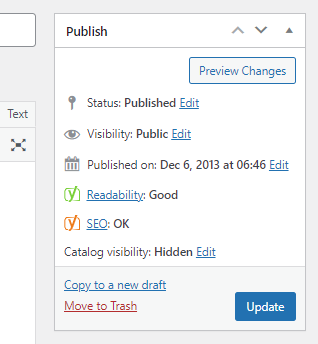
Another tip to keep up your sleeve when things don't look quite right.

I’ve been building WordPress websites for over a decade, spoken at conferences around the world, and taught countless people how to build and maintain their sites.
I know its a jungle out there finding the right people for website development.
But I’m here to help.
Author Profile – Tony Cosentino